How to Remove the DALL-E / ChatGPT Watermark (C2PA Metadata)
When you generate an image with DALL-E through ChatGPT, OpenAI doesn't stamp a visible logo in the corner. The watermark is invisible: it's a cryptographic signature called C2PA embedded directly in the file's metadata. This guide explains exactly what it is, how to verify it's there, and how to remove it — using the right tool for the job.
What is C2PA, exactly?
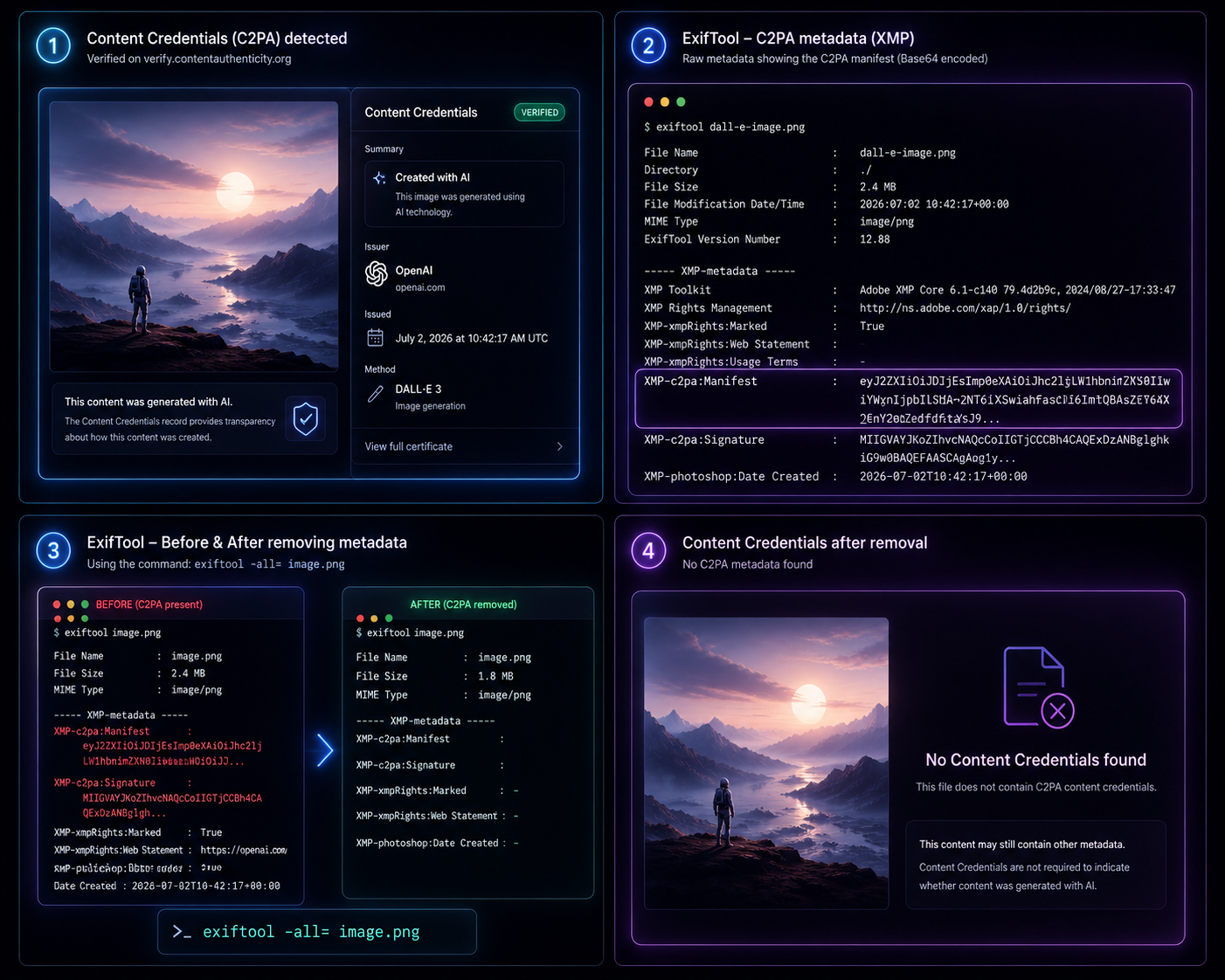
C2PA (Coalition for Content Provenance and Authenticity) is an industry standard backed by Adobe, Microsoft, OpenAI, Google, and others. Instead of altering the image itself, it attaches a signed manifest to the file — a record stating who generated the content, when, and with what tool. OpenAI has embedded this in every DALL-E image generated through ChatGPT since 2024.
This manifest lives in the image's XMP metadata block, specifically under fields like XMP-c2pa:Manifest and XMP-c2pa:Signature. Tools like Content Credentials Verify read this block and display a "Created with AI" badge, the issuer (OpenAI), and a timestamp.
Why does this matter?
For most casual use, it doesn't — the badge is informational. But it becomes relevant when:
- You're repurposing AI-generated images commercially and don't want the file to broadcast its origin to anyone who inspects it.
- A platform or client explicitly requires files with no embedded provenance metadata.
- You've edited the image significantly and the original "Created with AI" record no longer accurately describes the final file.
Step 1: Check if your image has C2PA metadata
Before removing anything, confirm it's actually there. Two ways to check:
Option A — Web verification
Upload the image to verify.contentauthenticity.org. If C2PA data is present, it will show the issuer, generation method, and timestamp.
Option B — ExifTool (command line)
Install ExifTool (free, cross-platform), then run:
exiftool dalle-image.pngLook for a block of XMP fields near the bottom of the output — specifically XMP-c2pa:Manifest, which will show as a long Base64-encoded string, along with XMP-c2pa:Signature and XMP-xmpRights:Marked set to True.
Step 2: Remove the metadata with ExifTool
Once confirmed, stripping it is a single command:
exiftool -all= dalle-image.pngThis removes all metadata from the file — not just the C2PA fields, but EXIF, XMP rights statements, and creation dates too. If you only want to target the C2PA-specific fields and keep other metadata (like camera EXIF data on a photo you later touched up), you can be more surgical:
exiftool -XMP-c2pa:all= dalle-image.pngExifTool creates a backup of the original file by default (with a _original suffix) before modifying it, so you can always revert if needed.
Step 3: Verify the removal
Run the same check from Step 1 again. On the command line:
exiftool dalle-image.pngThe XMP-c2pa fields should no longer appear in the output. If you re-upload the file to Content Credentials Verify, it will now report "No Content Credentials found."
Common mistakes
- Using a screenshot instead of the original file. Taking a screenshot of the DALL-E image strips metadata as a side effect, but also degrades image quality — not a reliable method if you need the full-resolution original.
- Assuming a visible watermark tool will work. AI watermark removers, including WatermarkOff, operate on pixels. C2PA has no pixels to edit — it's metadata, not an image feature.
- Forgetting the backup file. ExifTool's default backup behavior leaves a duplicate file on disk. Clean these up if you're processing many images, or add
-overwrite_originalto skip the backup entirely.
FAQ
Does WatermarkOff remove the DALL-E C2PA watermark?
No. WatermarkOff removes visible watermarks from images using AI inpainting. The DALL-E/ChatGPT watermark is invisible metadata, not a visual element, so a visual tool cannot touch it. Use the ExifTool method above instead.
Is it legal to remove C2PA metadata from AI images?
In most jurisdictions, stripping metadata from your own generated images is legal. Some platforms and use cases (news publishing, political content) may separately require disclosure that content is AI-generated, regardless of metadata — check the rules that apply to where you're publishing.
Will removing C2PA metadata make my image look different?
No. C2PA data lives in the file's metadata, not in the pixels. Stripping it doesn't change how the image looks, only removes the embedded provenance record.
Have a visible watermark to remove too?
If your image also has a visible logo, text, or stock-photo watermark, WatermarkOff removes it in seconds — free.
Try WatermarkOff free